Criteria Tab
The Criteria tab is available in the TAM Reports programFrom Home Base, click Reports. Select the Criteria tab. From Home Base, click Reports; then select the Criteria tab. The tab is made up of the report name (in red at the top of the tab), the list of criteria, and settings selected for each.
Right click on a criterion to view the following option menu.
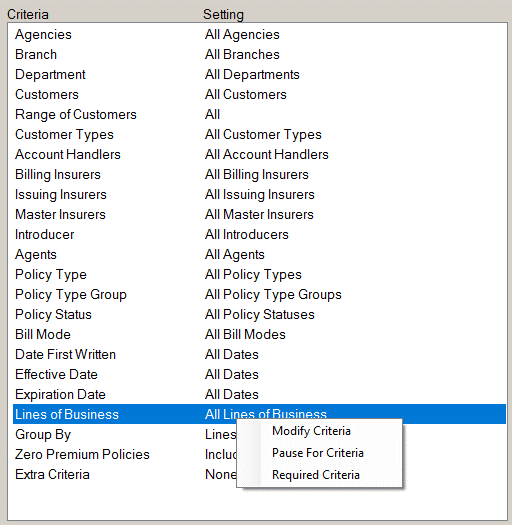
- Modify Criteria: Displays a window containing the available settings for the selected criterion. You can change the setting for the individual criterion through this option as you can through the Modify Criteria button.
- Pause for Criteria: Marks the criteria setting for review each time you click Ask and Run. When you click Ask and Run, the program runs the selected report and pauses to display the options for the criterion. This enables you to confirm or change the setting each time the report is run.
- Required Criteria: Marks the criteria setting for review each time you run the report, even if Ask and Run is not selected.
To see if a criterion has already been selected for review, right click the criterion. If Pause for Criteria or Required Criteria has already been selected, a checkmark displays next to that item.
The following buttons are available on the right side of the screen:
- Modify Criteria- Define the parameters for one criterion at a time, and, if applicable, add custom filters to your report.
- Ask and Run- Begin running the selected report, receiving prompts to modify the options for each criterion marked to Pause for Criteria or Required Criteria.
- Save Criteria- Save the current criteria settings for future use.
- Load Criteria- Restore previously saved criteria settings.